
Important information
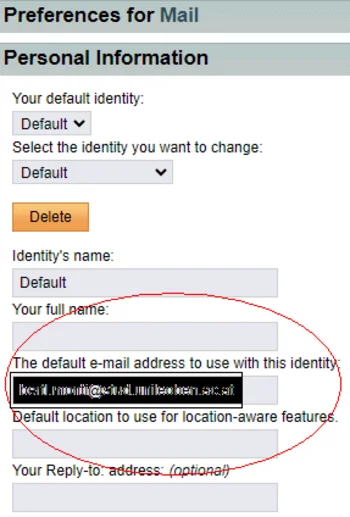
If you encounter the error message: “missing domain” when trying to send an email, please change your default email address in
settings – settings for mail – personal information
from: pxxxxxxx(at)stud.unileoben.ac.at
to: givenName.familyName(at)stud.unileoben.ac.at (as shown in your MUonline profile field)
Access via IMAP and POP3 is only possible via SSL-encrypted protocol variants – when selecting your client, please ensure that these protocols are supported!
Current versions of Mozilla Thunderbird or Microsoft Outlook support these protocols. The SMTP server (outgoing mail server) is available from all networks after successful authentication.
Setup in Outlook (from version 2016)
| INBOX | IMAP (Internet Message Access Protocol) |
| USERNAME/PASSWORD: | MUonline login details |
| INBOX SERVER | studmail.unileoben.ac.at |
| PORT: | 993 |
| ENCRYPTION: | SSL |
| OUTBOX | SMTP (Simple Mail Transfer Protocol) |
| USERNAME/PASSWORD: | Email address and MUonline password |
| OUTBOX SERVER | mgate3.unileoben.ac.at |
| PORT: | 587 |
| ENCRYPTION: | StartTLS |
- Webmail offers fully encrypted transmission (SSL). All you need to use this service is a browser (Internet Explorer, Mozilla Firefox, Google Chrome, etc.). Cookies and JavaScript must be enabled in your browser. Webmail uses IMAP internally to access your mailbox.
- Please use your MUonline login details as your username and password.
- Please note: POP3 support was discontinued in 2007.
You can access the webmail interface at studmail.unileoben.ac.at.
| HCL Notes | IMAP users | STUDMAIL | |
|---|---|---|---|
| Maximum mail size | 20 MB | 20 MB | 20 MB |
| Mail database size | 1 GB | 300 MB | - |
| Mail archive size | 10 GB | - | - |
| Mailbox | - | - | 2 GB |
For more information on using the email services, please visit the mail portal for studentshttps://studmail.unileoben.ac.at under ‘Help’.